
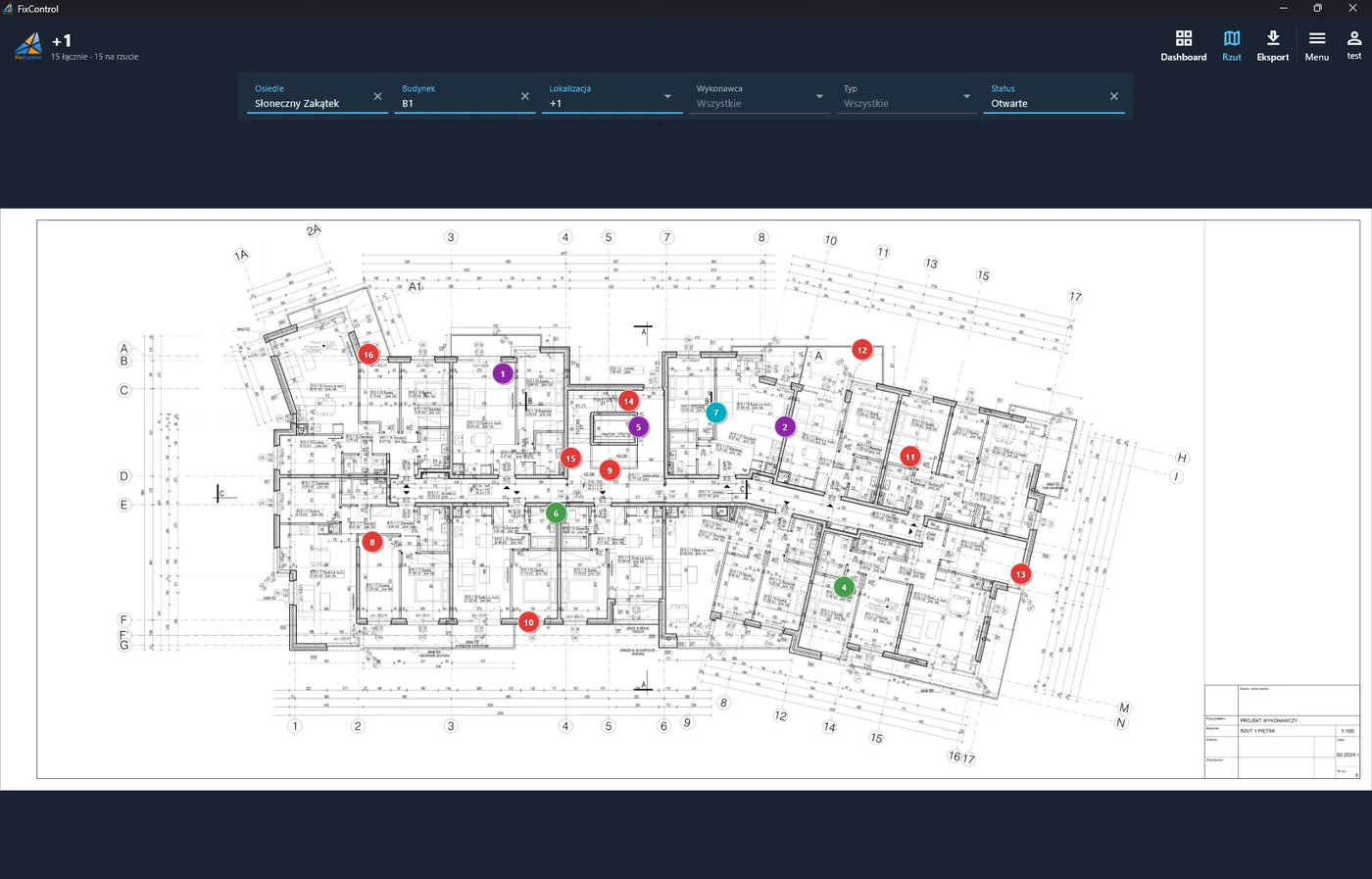
A punch list is a list of defects, missing items and work to be completed that must be closed before a project is accepted and settled. Each item states what is wrong, where exactly, who should fix it and what status it has. In Poland, this same document is usually called a defects list, list of defects and missing items, or a list of corrections to the acceptance report.
It sounds simple, but every site manager knows that with hundreds of items, several floors and dozens of subcontractors, a punch list can fall apart faster than the schedule. In this guide, we explain what a punch list is, what each item should contain, and how to manage it so that the acceptance process doesn't drag on for weeks.
Punch list – what is it?
The term comes from American construction practice. A punch list is typically prepared towards the end of the project, when the building is "basically ready" but still requires corrections: an unpainted wall, missing trim, scratched joinery or a non-functioning socket. The investor or inspector walks through the building with the contractor, notes everything that deviates from the contract and design, and the contractor commits to removing it before final acceptance and final payment.
On Polish construction sites, a punch list appears in several situations:
- before partial or final acceptance from the general contractor or investor,
- in apartment handovers with clients, when the defects list becomes an attachment to the acceptance report,
- during the project, as ongoing quality control of subcontractor work,
- during the warranty period, during inspections and claims from users.
It works best to maintain a punch list from the start of construction rather than just a week before handover. A defect caught at the raw stage costs a few minutes of work. The same defect after cladding is installed means chiselling and arguments about who will pay.
What should each punch list item contain?
A good defects list item answers five questions: what, where, who, when and what status. In practice, this translates to the following fields:
| Field | Example | Why |
|---|---|---|
| Number (ID) | B1_+1_16 | Unambiguous reference in emails, meetings and reports. |
| Location | Building B1, floor +1, point on plan | The contractor goes straight to the defect location, no searching. |
| Description | Missing balcony railing – install | What is wrong and what needs to be done. |
| Photo | Construction site photograph | Evidence of condition before and after repair. |
| Responsible contractor | Beton-Bud | Each item has one owner. |
| Type / trade | Construction, acceptance, warranty | Filtering and reports for different stages. |
| Status | Open → Completed → Closed | You know what awaits repair and what awaits verification. |
| Dates and history | Added 12.05, completed 15.05 | Who, what and when changed, i.e. argument in case of dispute. |
If your punch list is missing any of these elements, that's usually where the phone calls with questions and delays start.
Common punch list problems and how to solve them
1. "Which window?", or imprecise location
A description like "crack by a window, 2nd floor, I think left staircase" is only understandable to the person who wrote it. The contractor wastes time searching, and sometimes repairs the wrong place. This is the most common cause of prolonged handovers.
Solution: mark the defect directly on the floor plan or apartment plan. A pin on the plan is unambiguous regardless of who reads the list. In the FixControl app, you upload the plan as a regular PDF, and add the defect by tapping on the location on the plan. Each contractor has their own marker colour, so you can immediately see who has the most to fix.
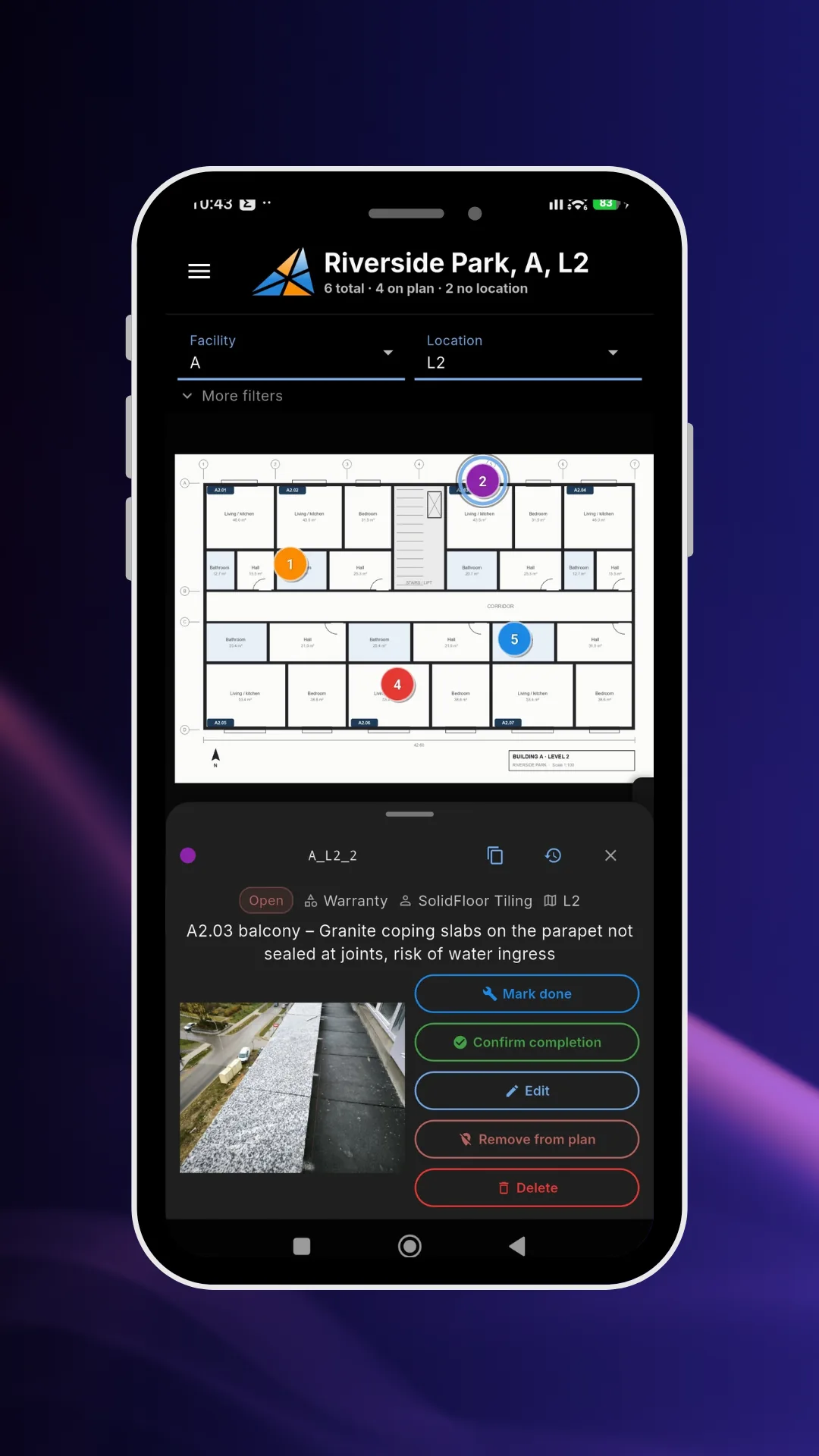
Defect B1_+1_16 marked on floor plan +1. Tap on the pin to see the description, photo, contractor and status.
2. Photos in the phone, description in a spreadsheet
The inspector takes dozens of photos, and in the evening tries to match them to rows in Excel. Some get lost, some go to the wrong item. The contractor gets a list without photos or a folder of photos without the list.
Solution: the photo must be part of the punch list item, not a separate file. Take it right away when adding the defect, from the same form. You can dictate the description by voice, which really makes a difference when you're on scaffolding in gloves.
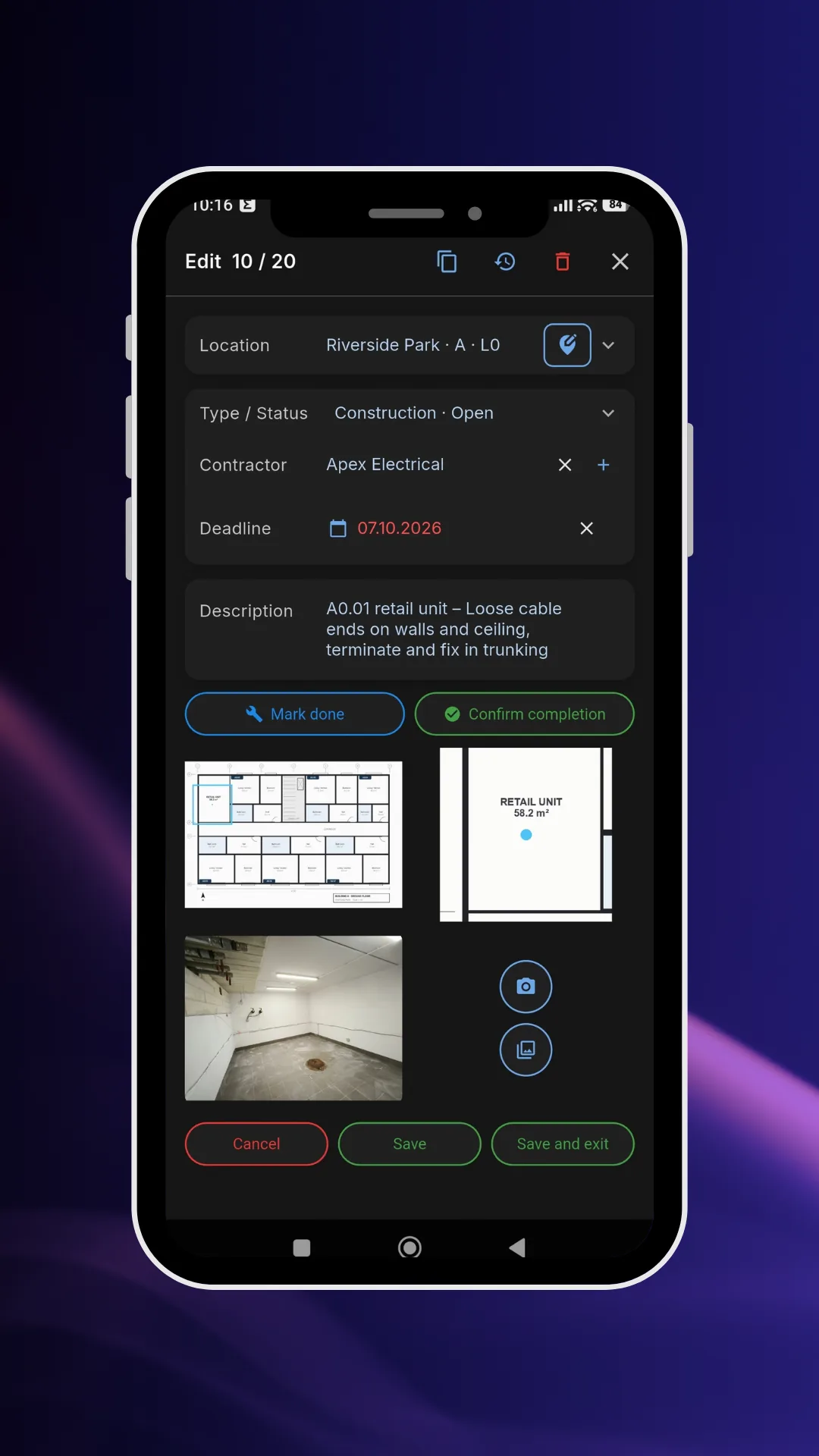
One defects list item: description, type, status, contractor and photo in one record.
3. Five versions of the same Excel file
"Defects_list_final_v3_corrected.xlsx" circulates by email between the investor, general contractor and subcontractors. Everyone adds something, nobody knows which version is current, and items closed in one file are still open in another.
Solution: one shared list in the cloud that everyone can access with appropriate permissions. Changes are visible to everyone immediately, and filters allow everyone to see only what concerns them, e.g. one building, one contractor or only open items.
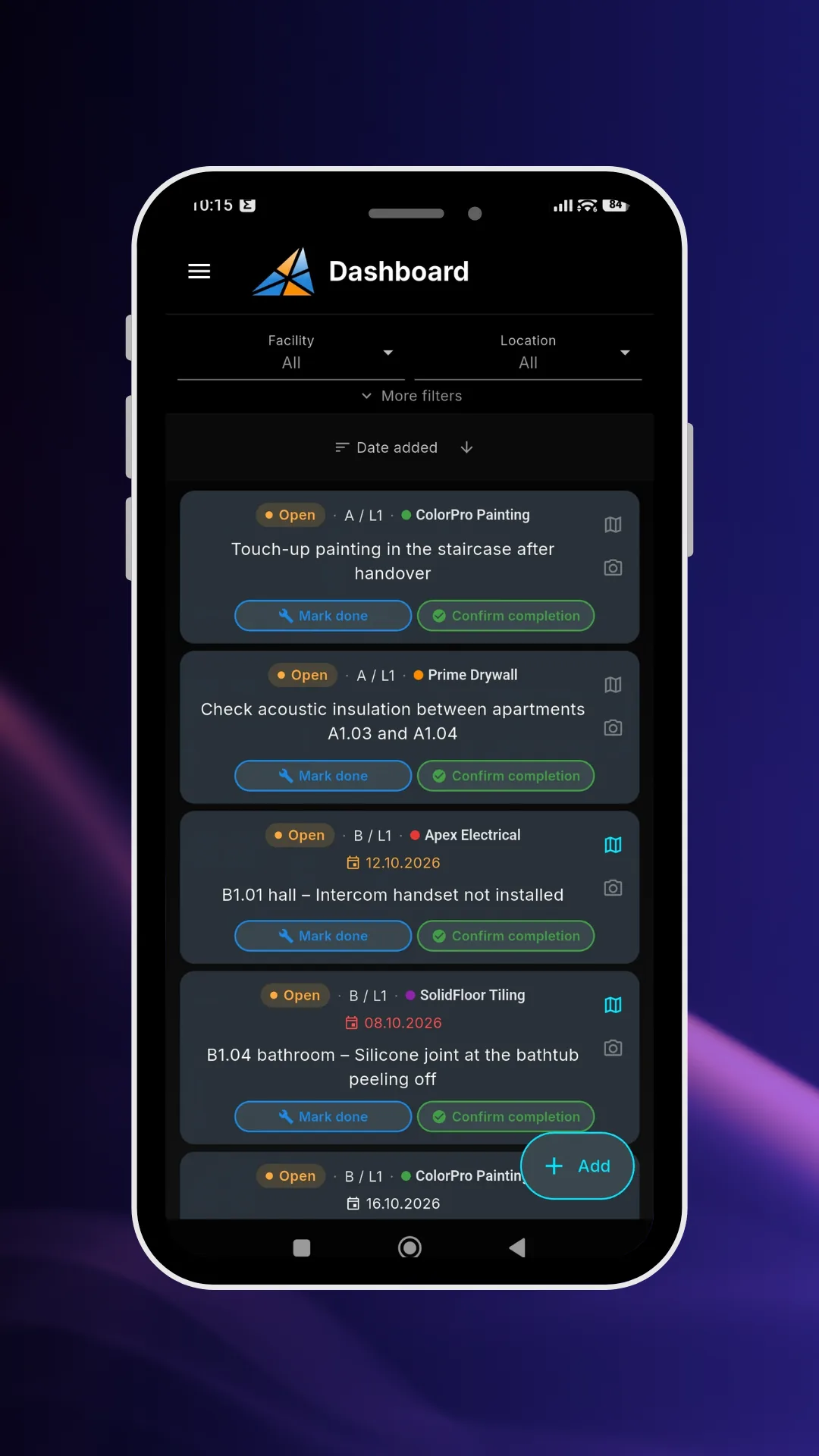
Shared defects list with filters by property, location, contractor, type and status, without file versions circulating.
4. "Done" without checking
The contractor reports that the defect is fixed, someone crosses off the item and the issue disappears. At handover it turns out the correction was incomplete or never done at all.
Solution: separate "completed" from "closed". The contractor marks the repair as completed, and the inspector or manager confirms it or sends it back for correction. In FixControl, there are buttons "Completed", "Confirm completion" and "Needs rework", and each status change is recorded in the defect history with date and author.
5. Hours spent on reports for subcontractors
Before a coordination meeting you need to prepare a separate summary for each subcontractor: filter rows, copy photos, describe locations. This can take a whole day.
Solution: generate reports automatically from the same list. A PDF report with a plan, numbered pins, a defects table and photos is created in seconds, also as a separate file for each contractor. If someone prefers a spreadsheet, you export the same list to XLSX.
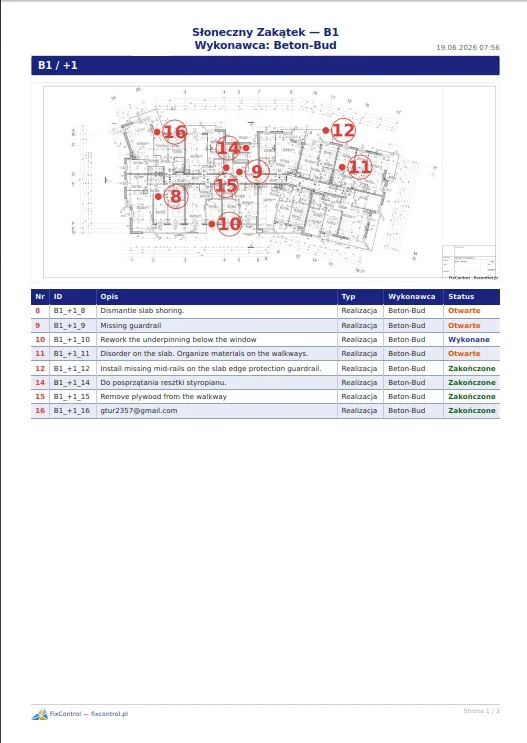
PDF report for one contractor: floor plan with defect numbers and item table with statuses.
How to manage a punch list step by step
- Prepare the structure. Divide the investment into buildings and floors or apartments, and upload the current plan to each location.
- Add contractors. Each trade and each subcontractor is a separate entry, so each defect has one person responsible.
- Establish description guidelines. Briefly, specifically, preferably with an action to take ("seal gaps around shower tray" rather than just "seal"). One defect equals one item.
- Collect defects on an ongoing basis, in the field. During inspections, add items right away on the plan, with a photo. Don't transcribe notes in the evening.
- Pass lists to contractors. Send a report or give the contractor their own account where they only see their defects.
- Verify and close. An item marked as completed comes back for inspection. Only the person who reported it or the site manager can close it.
- Review the list regularly. A brief review of open items once a week, filtered by contractor, keeps the pace up and shows who is blocking acceptance.
Best practices that speed up handovers
- Start early. A punch list managed from the raw stage is shorter at the end.
- Don't combine several problems into one item. "Bathroom – various corrections" will never be closed.
- Always add a photo, also after repair. It's the best evidence in disputes and claims.
- Separate defect types, e.g. construction, acceptance and warranty defects, so you can report each stage separately.
- Don't delete items, just close them. Change history protects both parties to the contract.
- Give contractors access only to their tasks. Less noise means faster repairs.
Paper, Excel or a punch list app?
| Paper | Excel | App (e.g. FixControl) | |
|---|---|---|---|
| Defect location | Verbal description | Verbal description | Pin on plan |
| Photos | Separate | Separate or manually pasted | In the item, straight from phone |
| Currency | One sheet | Multiple file versions | One list for everyone |
| Statuses and verification | Crossings out | Column for manual editing | Workflow with confirmation and history |
| Contractor reports | Photocopies | Manual filtering | PDF and XLSX in seconds |
| Barrier to entry | None | Low | Upload PDF plans |
With a dozen or so defects in one apartment, a sheet or spreadsheet is enough. With several buildings, hundreds of items and many subcontractors, a tool that combines description, photo and location on a plan pays for itself on the first handover.
Punch list in FixControl
FixControl is an app for managing defects lists on plans, running on Android, iOS, Windows and in a browser. It works well for both contractors and investors:
- For contractors and finishing crews: receiving defects lists from the general contractor, investor or tenant, assigning corrections to teams and quickly closing items before handover.
- For developers and general contractors: supervising multiple sites from one panel, apartment handovers with clients and reports ready to pass on.
Plans and limits (number of plans, defects and accounts) can be found in the FixControl pricing. You can start with one construction site and see how much time it saves you at the next handover.
FAQ – frequently asked questions about punch lists
What is a punch list?
A punch list is a list of defects, missing items and minor work to be completed that the contractor must remove before final acceptance of the project. Each item contains a description of the problem, location, responsible contractor and status.
What is a punch list called in Polish?
Most often a defects list, list of defects and missing items, list of corrections or defects attachment to the acceptance report. On construction sites with foreign companies involved, the English terms punch list or snag list are also used.
Who prepares the punch list?
Usually the investor, supervising inspector or site manager on behalf of the general contractor, often during a joint inspection with the contractor. When apartments are handed over, the defects list is created together with the buyer.
When is a punch list created?
Classically towards the end of the project, before final acceptance. In practice, it's best to maintain it from the start of construction as ongoing quality control, then continue during partial handovers, apartment handovers and warranty inspections.
What should a defects list item contain?
A number, exact location (ideally a point on the plan), description of the defect and required action, a photo, responsible contractor, defect type, status and change history with dates.
What is the difference between a punch list and an acceptance report?
An acceptance report documents the handover itself: who, when and what was accepted and with what reservations. A punch list is a detailed list of those reservations, i.e. defects to be removed, often attached to the report as an attachment and settled item by item.
Can a punch list be managed in Excel?
Yes, with a small number of items. With many floors and subcontractors, Excel loses clarity: location is a verbal description, photos are separate, and files spread across multiple versions. A defects app combines these elements in one shared list.
How to quickly close a punch list before handover?
Assign each item to one contractor, send each only their list with plans and photos, separate "completed" status from "closed" and do a weekly review of open items. The most time is saved by unambiguous defect location on the plan.